Friday, 16 August 2013

CRM 2011 Connections - How to filter Connection Roles?

I’m not going to explain the uses of Connections within CRM 2011, I think we are all aware of their benefits by now.

This post is to share my opinion of the default behavior of the Connection entity form, whereby the "As this role" look up field displays all the Connection Roles defined, where in comparison I with many others believe it should by default filter to only those for the specific Entity.

Example Solution
You could potentially create some Views, but you could end up with quite a few, depending on the number of entities you are using Connections with.

In this case I prefer to use a Custom Lookup, the main benefits are that the user doesn't have to select the view, as these are defaulted to what we set them too and eliminates room for error.

For the purpose of this example, the following code filters the look up based on which Roles are applicable to the connecting from entity type.

  1. function filterConnectionRoles() {
  2.   try {
  3.     // Identify Connecting From Entity
  4.     var connectfromEntity = Xrm.Page.getAttribute("record1id").getValue()[0].typename;
  5.  
  6.     // Construct oData query to retrieve list of associated Connection Roles
  7.     var oDataEndpoint = Xrm.Page.context.getServerUrl() + "/XRMServices/2011/OrganizationData.svc";
  8.     var oDataQuery = oDataEndpoint + "/ConnectionRoleObjectTypeCodeSet?$filter=AssociatedObjectTypeCode eq '"
  9.         + connectfromEntity + "'&select=ConnectionRoleId";
  10.  
  11.     // Execute oData Query
  12.     $.ajax({
  13.       type: "GET",
  14.       contentType: "application/json; charset=utf-8",
  15.       datatype: "json",
  16.       url: oDataQuery,
  17.       beforeSend: function (XMLHttpRequest) {
  18.         XMLHttpRequest.setRequestHeader("Accept", "application/json");
  19.       },
  20.       success: function (data, textStatus, XmlHttpRequest) {
  21.         if (data != null) {
  22.  
  23.           // Build the condition values
  24.           var conditionValues = "";
  25.           for (var i = 0; i < data.d.results.length; i++) {
  26.             conditionValues += "<value>" + data.d.results[i].ConnectionRoleId.Id + "</value>";
  27.           }
  28.  
  29.           if (conditionValues.length > 0) {
  30.             // Construct Fetch Query
  31.             var viewId = "{E3319041-5017-4353-A578-AEC2CCF28DA8}";
  32.             var viewDisplayName = "Connection Roles";
  33.             var fetch = "<fetch version='1.0' output-format='xml-platform' mapping='logical' distinct='false'>" +
  34.                             "<entity name='connectionrole'>" +
  35.                                 "<attribute name='name' />" +
  36.                                 "<attribute name='connectionroleid' />" +
  37.                                 "<order attribute='name' descending='false' />" +
  38.                                 "<filter type='and'>" +
  39.                                     "<condition attribute='connectionroleid' operator='in' >" +
  40.                                     conditionValues +
  41.                                     "</condition>" +
  42.                                 "</filter>" +
  43.                             "</entity>" +
  44.                         "</fetch>";
  45.  
  46.             // Construct Grid Layout
  47.             var grid = "<grid name='resultset' object='3231' jump='name' select='1' icon='1' preview='1'>" +
  48.                 " <row name='result' id='connectionroleid'>" +
  49.                     " <cell name='name' width='200' />" +
  50.                 " </row>" +
  51.             "</grid>";
  52.  
  53.             // Add Custom Lookup View
  54.             $("#record2roleid").attr("disableViewPicker", "0");
  55.             Xrm.Page.getControl("record2roleid").addCustomView(viewId, "connectionrole", viewDisplayName, fetch, grid, true);
  56.             $("#record2roleid").attr("disableViewPicker", "1");
  57.           }
  58.         }
  59.       },
  60.       error: function (XmlHttpRequest, textStatus, errorThrown) {
  61.         alert('oData Error: ' + oDataQuery);
  62.       }
  63.     });
  64.   }
  65.   catch (ex) {
  66.     alert(ex);
  67.   }
  68. }

Thursday, 15 August 2013

How to Open a new Form & Set Field Values?

Here's a short post demonstrating how you can use JScript to open a new CRM form window, and set the field values in CRM 2011.

There are two methods to achieve this. Both involve using JavaScript, however selecting the best approach depends on what you want to do with the window once opened?

Method A - Xrm.Utility.openEntityForm 
This uses the Xrm utility helper object provided as part of the CRM platform. Under the hood, it is using the same call as method 2 to launch the new window. But the benefits are that it eliminates the need of creating and encoding the URL to the entity type you want to open.

Disadvantages are that you get no handle to the newly opened window.

Method B - window.open 
This is the standard JavaScript method of launching a new window. All you old school developers should be familiar with this one :) 
The disadvantage with this approach is that you have to construct the correct URL in order to launch the correct CRM Form. 

The benefit with this method is that you can obtain a handle to the new window and perform the actions you JavaScript junkies are accustomed too.

Example Solutions
The following are examples of both methods using the Contact entity for demonstration purposes:


  1. function openNewForm_MethodA()
  2. {
  3.     var params = {};
  4.     
  5.     //Set Parent Customer Lookup Field
  6.     params["parentcustomerid"] = "EA27A654-79EA-400B-9DE6-84C8E11394B4";
  7.     params["parentcustomeridname"] = "My Account Name";
  8.     params["parentcustomeridtype"] = "account";
  9.     
  10.     //Set Standard Text Fields
  11.     params["firstname"] = "John";
  12.     params["lastname"] = "Smith";
  13.     params["mobilephone"] = "1234567890";
  14.     params["emailaddress1"] = "mail@domain.com";
  15.         
  16.     //Open new Window/CRM Form
  17.     Xrm.Utility.openEntityForm("contact", null, params);
  18. }
  19.  
  20. function openNewForm_MethodB()
  21. {
  22.     //Set Parent Customer Lookup Field
  23.     var extraqs = "parentcustomerid={EA27A654-79EA-400B-9DE6-84C8E11394B4}";
  24.     extraqs += "&parentcustomeridname=My Account Name";
  25.     extraqs += "&parentcustomeridtype=account";
  26.     
  27.     //Set Standard Text Fields
  28.     extraqs += "&firstname=John";
  29.     extraqs += "&lastname=Smith";
  30.     extraqs += "&mobilephone=1234567890";
  31.     extraqs += "&emailaddress1=mail@domain.com";
  32.  
  33.     //Set Features & Open new Window/CRM Form
  34.     var features = "location=no,menubar=no,status=no,toolbar=no";
  35.     var newWindow = window.open("/main.aspx?etn=contact&pagetype=entityrecord&extraqs=" +
  36.     encodeURIComponent(extraqs), "_blank", features, false);
  37.     
  38.     //Optionally - you can interact with the Window e.g. Resize it etc...
  39.     newWindow.resizeTo(528, 500);
  40. }

Saturday, 3 August 2013

CRM 2011 - PluginType' entity doesn't contain attribute with Name = 'customworkflowactivityinfo'.

Thought I'd share a quick post, regarding an error you may get when trying to import a solution into a CRM 2011 organization.

PluginType' entity doesn't contain attribute with Name = 'customworkflowactivityinfo'.

The issue is caused by a version difference between the source and destination CRM servers. 

Solution

1. Check that the destination CRM server has the same or greater Update Rollup installed. If not then update the destination server. Update 10 or greater is required if you had imported this organization from a CRM 4.0 system.
2. Using Deployment Manager verify that the Organization you are attempting to import the solutions into has the correct version, if not then use the Update process.
This should resolve the issue.

Friday, 19 July 2013

CRM 2011 - Custom Lookup Example

Dynamically changing the way a CRM Lookup field works is something that most developers come across, especially when they want to:
  1. Filter the records that are displayed in the Lookup window
  2. Change the columns displayed in the Lookup window
  3. Change the entity type
Regardless of the requirement, the only way to customize a CRM Lookup field is to use client-side JScript/JavaScript.

The steps to customize a CRM Lookup field are as follows:

  1. function CustomLookup() {
  2.  
  3.     //1. Random Guid
  4.     var viewId = "{1BFB2B35-B07C-44D1-868D-258DEEAB88E2}";
  5.  
  6.     //2. The Display Name of the View
  7.     var viewDisplayName = "My Accounts";
  8.  
  9.     //3. The Entity Type that you want the Lookup to us
  10.     var entityName = "account";                             e
  11.  
  12.     //4. The FetchXml Query which is executed to return the data to the Lookup window
  13.     var cFetchXml =
  14.                 "<fetch version='1.0' output-format='xml-platform' mapping='logical' distinct='false'>" +
  15.                 "<entity name='" + entityName + "'>" +
  16.                     "<attribute name='name' />" +
  17.                     "<attribute name='accountid' />" +
  18.                     "<order attribute='name' descending='false' />" +
  19.                     "<filter type='and'>" +
  20.                         "<condition attribute='name' operator='in' >" +
  21.                             "<value>Microsoft</value>" +
  22.                             "<value>Salesforce</value>" +
  23.                             "<value>Oracle</value>" +
  24.                         "</condition>" +
  25.                     "</filter>" +
  26.                  "</entity>" +
  27.                 "</fetch>";
  28.  
  29.     //5. Layout - this section defines which columns are displayed, width of the column etc
  30.     var cGridLayout =
  31.         "<grid name='resultset' object='1' jump='name' select='1' icon='1' preview='1'>" +
  32.             "<row name='result' id='accountid'>" +
  33.                 "<cell name='name' width='100' />" +
  34.             "</row>" +
  35.         "</grid>";
  36.     
  37.     $("#lookupControlId").attr("disableViewPicker", "0");
  38.  
  39.     //6. Add the Custom Lookup
  40.     Xrm.Page.getControl("lookupControlId").addCustomView(viewId,
  41.         entityName,
  42.         viewDisplayName,
  43.         cFetchXml,
  44.         cGridLayout,
  45.         true);
  46.  
  47.     $("#lookupControlId").attr("disableViewPicker", "1");
  48. }


Tuesday, 18 June 2013

CRM 2011 - Reports created using Report Wizard not Working?

Some of you may have experienced an issue where FetchXml based reports created using the CRM Report Wizard don't work, typically the reports will fail with an rsProcessingAborted error.

Reporting logs will show an error similar too:

Microsoft.Crm.CrmException: An unexpected error occurred.
System.ServiceModel.Security.SecurityNegotiationException: A call to SSPI failed, see inner exception.
System.Security.Authentication.AuthenticationException: A call to SSPI failed, see inner exception.
System.ComponentModel.Win32Exception: The target principal name is incorrect

The cause of this issue is that the SPN's have not been set correctly. FetchXML queries require a HTTP SPN to communicate to the server. The MS CRM app pool is using a domain service account, and the query will be looking for an HTTP SPN that does not exist.

Solution

To best describe how to resolve this, the scenario we will use is:

Load Balanced Environment
  • Load Balanced URL - https://mycrm.domain.com/MyOrg

CRM Application Servers
  • Windows Server 2008 - Machine Name: WINSVRCRM1
  • Windows Server 2008 - Machine Name: WINSVRCRM2
CRM Application Pool Identity
  • Domain\CrmServiceAccount
The SPNs you need to set based on this configuration is as follows:
  • HTTP/mycrm
  • HTTP/mycrm.domain.com
  • HTTP/WINSVRCRM1
  • HTTP/WINSVRCRM1.domain.com
  • HTTP/WINSVRCRM2
  • HTTP/WINSVRCRM2.domain.com
Additionally you will want to add SPN's for the load balancer.

Add SPN Command
To add a new SPN entry, open a command prompt with admin privilages and use the following command replacing with the appropriate values:

setspn -a HTTP/<ServerName> <ServiceAccountDomain>\<ServiceAccount>

Monday, 13 May 2013

CRM 2011 - JScript Error on Form Load (Errors On Page)

There are many reasons and causes of client side JScript errors, any line of code that has insufficient exception handling can result in an error message, for example when you are trying to call a function onload that doesn't exist. As you can see below, it's clear what the error is.
However there are scripting errors that are much harder to identify, which are displayed via the "Microsoft Dynamics CRM has encountered an error." dialog. Typically you will also get a "Errors on pageat the bottom left hand corner of your IE window:

Example Error
A recent example is where a colleague was experiencing errors after installing Rollup 12 and 13. The data being sent to Microsoft is displayed below:
Data that will be sent to Microsoft
  1. <CrmScriptErrorReport>
  2.   <ReportVersion>1.0</ReportVersion>
  3.   <ScriptErrorDetails>
  4.     <Message>Syntax error</Message>
  5.     <Line>306073745</Line>
  6.     <URL>/userdefined/edit.aspx?_gridType=4200&etc=4207&id=%7b998C4134-EAB3-E211-9A96-005056BC08B2%7d&pagemode=iframe&preloadcache=1368438373440&rskey=68511477</URL>
  7.     <PageURL>/userdefined/edit.aspx?_gridType=4200&etc=4207&id=%7b998C4134-EAB3-E211-9A96-005056BC08B2%7d&pagemode=iframe&preloadcache=1368438373440&rskey=68511477</PageURL>
  8.     <Function>anonymous(container,scriptContent,id){if(IsNull(container))container=this.get_headElement();var$v_0=container.ownerDocument.createElement("script");container.appendChild($v_0);!isNullOrEmptyString(id)&&$v_0.setAttribute("id",id);$v_0.setAttribute("type","</Function>
  9.     <CallStack>
  10.       <Function>anonymous(container,scriptContent,id){if(IsNull(container))container=this.get_headElement();var$v_0=container.ownerDocument.createElement("script");container.appendChild($v_0);!isNullOrEmptyString(id)&&$v_0.setAttribute("id",id);$v_0.setAttribute("type","text/javascript");$v_0.text=scriptContent}</Function>
  11.       <Function>anonymous(container,scriptFile){var$v_0=scriptFile.toString();if(this.$4V_1($v_0))return;var$v_1=this.fetchExternalFile($v_0);this.addIncludeInline(container,$v_1,$v_0)}</Function>
  12.       <Function>anonymous(uri,useInlineScripts,scriptLoaded){if(uri.get_path().toUpperCase()==="/_STATIC/_COMMON/SCRIPTS/GLOBAL.JS")uri=Mscrm.CrmUri.create("/_common/global.ashx");if(useInlineScripts)Mscrm.CrmHeader.get_scriptLoader().addIncludeExternalSync(null,uri);elseMscrm.CrmHeader.get_scriptLoader().addIncludeExternalCallback(null,uri,scriptLoaded)}</Function>
  13.       <Function>
  14.         anonymous($p0,$p1,$p2,$p3){Mscrm.CrmHeader.setScriptFile(Mscrm.CrmUri.create($p1),true);for(var$v_0=window,$v_1=$p0.split("."),$v_2=0;$v_2<$v_1.length;$v_2++)if($v_0)$v_0=$v_0=""[$v_1=""[$v_2=""]];if=""(!IsNull=""($v_0="")&&typeof$v_0===Mscrm.TypeNames.functionType){var$v_3=this.$CN_1($p2,$p3);return$v_0.apply(null,$v_3)}returnnull}
  15.       </Function>
  16.       <Function>anonymous($p0,$p1){var$v_0=this.$9w_1($p0.FunctionName,$p0.Library,$p0.Parameters,null);if(!IsNull($v_0)&&typeof$v_0===Mscrm.TypeNames.booleanType)return$v_0;elsereturn$p1}</Function>
  17.       <Function>anonymous($p0){if(IsNull($p0))returnfalse;var$v_0=$p0.DefaultValue;switch($p0.RuleType){case8:$v_0=this.$Cz_1($p0);break;case1:$v_0=this.$D2_1($p0);break;case7:$v_0=this.$D3_1($p0,$p0.DefaultValue);break;case4:$v_0=this.$D4_1($p0,$p0.DefaultValue);break;case16:$v_0=this.$D5_1($p0);break;case2:$v_0=this.$D6_1($p0);break;case10:$v_0=this.$D7_1($p0);break;case19:$v_0=this.$D8_1($p0,$p0.DefaultValue);break;case17:$v_0=this.$D9_1($p0);break;case12:$v_0=this.$DA_1($p0);break;case6:$v_0=this.$D1_1($p0,$p0.DefaultValue);break;case5:$v_0=this.$DB_1($p0,$p0.DefaultValue);break;case11:$v_0=this.$DC_1($p0);break;case3:$v_0=this.$DD_1($p0,$p0.DefaultValue);break}if(IsNull($v_0))$v_0=IsNull($p0.DefaultValue)?true:$p0.DefaultValue;if(!IsNull($p0.InvertResult)&&$p0.InvertResult)$v_0=!$v_0;return$v_0}</Function>
  18.       <Function>
  19.         anonymous($p0,$p1){var$v_0=this.getEnableRuleDefinition($p0,$p1);if(IsNull($v_0)||IsNull($v_0.Rules)||!$v_0.Rules.length)returntrue;for(var$v_1=true,$v_2=0;$v_1&&$v_2<$v_0.Rules.length;$v_2++)$v_1=$"v_1"&&this.$9v_1($v_0.Rules[$v_2]);return$v_1}
  20.       </Function>
  21.       <Function>
  22.         anonymous($p0,$p1){if(IsNull(Mscrm.RibbonCommands.enableRules))returntrue;var$v_0=this.getCommandDefinition($p0,$p1);if(IsNull($v_0))returntrue;var$v_1=$v_0.EnableRules;if(IsNull($v_1))returntrue;for(var$v_2=true,$v_3=0;$v_2&&$v_3<$v_1.length;$v_3++){var$v_4=$"v_1"[$v_3=""];if=""(IsNull=""($v_4="")||!$v_4.length="")continue;$v_2=$"v_2"&&this.$D0_1($v_4,$p1)}return$v_2}
  23.       </Function>
  24.       <Function>anonymous($p0){if(!this.$5T_1)returnfalse;var$v_0=this.parseCommandFromRibbon($p0),$v_1=this.$CH_1($v_0.command,$v_0.entityLogicalName);if($v_1&&!IsNull(this.$H_1.$5A_2[$p0]))$v_1=Mscrm.RibbonNavigationModel.shouldContextGroupBeShown($v_0,this.$H_1);elseif($v_1&&!IsNull(this.$H_1.$28_2[$p0]))$v_1=Mscrm.RibbonNavigationModel.shouldTabBeShown($p0,$v_0,this.$H_1);if(!IsNull(this.$H_1.$28_2[$p0]))this.$H_1.$28_2[$p0]=$v_1;return$v_1}</Function>
  25.     </CallStack>
  26.   </ScriptErrorDetails>
  27.   <ClientInformation>
  28.     <BrowserUserAgent>Mozilla/4.0 (compatible; MSIE 8.0; Windows NT 6.1; WOW64; Trident/4.0; SLCC2; .NET CLR 2.0.50727; .NET CLR 3.5.30729; .NET CLR 3.0.30729; .NET4.0C; .NET4.0E)</BrowserUserAgent>
  29.     <BrowserLanguage>en-us</BrowserLanguage>
  30.     <SystemLanguage>en-gb</SystemLanguage>
  31.     <UserLanguage>en-gb</UserLanguage>
  32.     <ScreenResolution>1280x1024</ScreenResolution>
  33.     <ClientName>Web</ClientName>
  34.     <ClientTime>2013-05-13T10:46:58</ClientTime>
  35.   </ClientInformation>
  36.   <ServerInformation>
  37.     <OrgLanguage>1033</OrgLanguage>
  38.     <OrgCulture>1033</OrgCulture>
  39.     <UserLanguage>1033</UserLanguage>
  40.     <UserCulture>1033</UserCulture>
  41.     <OrgID>{53547D16-0D2B-4BB4-A05D-3451C1C375D6}</OrgID>
  42.     <UserID>{54CDC85A-52B9-E211-891A-005056BC2521}</UserID>
  43.     <CRMVersion>5.0.9690.3448</CRMVersion>
  44.   </ServerInformation>
  45. </CrmScriptErrorReport>

The Issue
After analyzing the call stack, it became apparent that the issue was originating from the Ribbon, relating to enable rules which rely on JScript functions to determine if the users has access to that functionality.

It was pretty obvious after looking at the Ribbon XML, the issue was that their was a missing $webresource prefix from the library paths.

Missing $webresource
  1. <EnableRule Id="Imp.Form.Task.DataGroupButtons.EnableRule">
  2.   <CustomRule Library="KSR/Script/Common/AccessLibrary.js" FunctionName="KSR.Common.hasUserITSRole" InvertResult="true">
  3.   </CustomRule>
  4. </EnableRule>
  5. <EnableRule Id="Imp.Form.Task.RestrictAccess.EnableRule">
  6.   <CustomRule Library="KSR/Script/Common/AccessLibrary.js" FunctionName="KSR.Common.enableRestrictAccessButton">
  7.   </CustomRule>
  8. </EnableRule>

The Fix
With the $webresource
  1. <EnableRule Id="Imp.Form.Task.DataGroupButtons.EnableRule">
  2.   <CustomRule Library="$webresource:KSR/Script/Common/AccessLibrary.js" FunctionName="KSR.Common.hasUserITSRole" InvertResult="true">
  3.   </CustomRule>
  4. </EnableRule>
  5. <EnableRule Id="Imp.Form.Task.RestrictAccess.EnableRule">
  6.   <CustomRule Library="$webresource:KSR/Script/Common/AccessLibrary.js" FunctionName="KSR.Common.enableRestrictAccessButton">
  7.   </CustomRule>
  8. </EnableRule>

Hope this helps :)

Thursday, 9 May 2013

How to get OptionSet values using SQL?

Obtaining a list of option values for a MS CRM 2011 OptionSet is pretty simple, especially if you plan to do this via the CRM Web service API. However a requirement may arise where you may want to do this using direct SQL against the Organization database.

Example Background

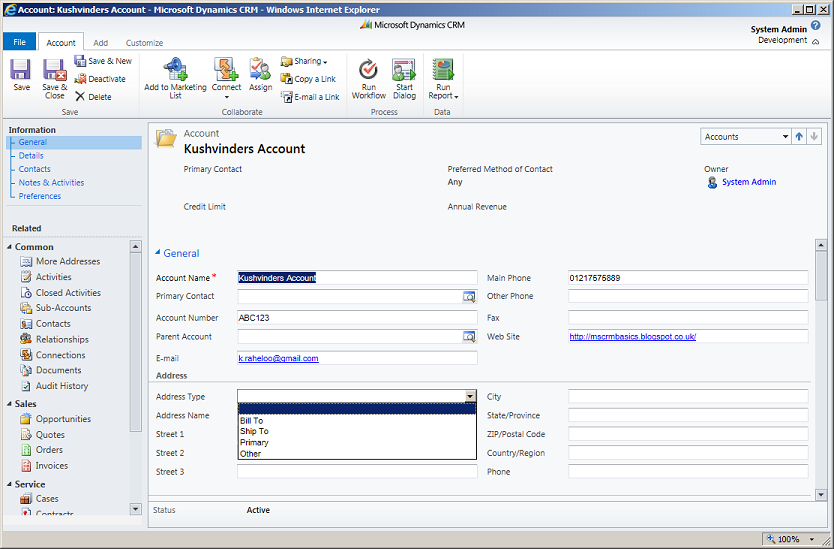
By default on the account entity there are several address fields, and one in particular is the Address Type picklist which is used to categorize the type of address stored for this account. Using this field as an example, the following SQL Query can be used to obtain a list of all options available to that field:


SQL Statement
  1. SELECT
  2. EV.LogicalName as Entity,
  3. ALV.Name as Attribute,
  4. LLV.Label,
  5. APV.Value
  6. FROM LocalizedLabelView as LLV
  7.     INNER JOIN AttributePicklistValueView as APV ON LLV.ObjectId = APV.AttributePicklistValueId
  8.     INNER JOIN OptionSetView as O ON APV.OptionSetId = O.OptionSetId
  9.     INNER JOIN AttributeLogicalView as ALV ON O.OptionSetId = ALV.OptionSetID
  10.     INNER JOIN EntityView as EV ON ALV.EntityId = EV.EntityId
  11. WHERE
  12.     ALV.Name like '%address1_addresstypecode%' AND EV.LogicalName = 'account'
  13. ORDER BY EV.LogicalName, ALV.Name, APV.Value

SQL Results


Enjoy :)

Action Microsoft.Crm.Setup.Common.Analyzer +CollectAction failed. Fatal error during installation

When installing the Srs Data Connection (Microsoft Dynamics CRM Reporting Extensions), you may have experienced the following error: ...